

Website Help
Need assistance using the website? Check below for common questions or email [email protected] for help finding information. For technical assistance, please contact the HOA Express Customer Success Team using the details provided below.
Website Overview
A complete guide to website sections, community resources and homeowner information.
HOME
CALENDAR
NEWS
COURTS
ACTIVITIES
DIRECTORY
|
COMMUNITY • Board Members
PHOTO GALLERY
SUPPORT
GATE ACCESS |
DOCUMENT LIBRARY
REFERENCE DOCUMENTS
Note: Committee Resources includes documentation related to all committees.
PRIVACY |
Quick Tips for Navigating the Website
- To explore the website, click on any heading in the list on the right-hand side. This will open a drop-down menu showing the available topics — simply select the one you’d like to view.
- To close the drop-down menu, click on Home to return to the main page.
- All features and functions are contained within the website. To go back to a previous screen, use your browser’s back arrow (←) instead of closing the page.
- If you accidentally close the window or tab, just reopen the website by typing the first few letters (for example, “ssrc”) in your browser’s address bar and selecting it from the suggestions. Your session will remain active and you won’t need to log in again.
- All forms are fillable PDFs. Download and open in a PDF viewer to fill out and save.
Using the Online Resident Directory Search Feature
- Open the Online Online Resident Directory after logging in.
- Use the Search bar at the top of the page.
- Enter a name or address (full or partial).
- Results update automatically as you type.
- Select the correct result and click the individual’s name to view their details.
- Clear the search field to return to the full directory.
Member Settings
The "Member Settings" area is where you can manage your member profile information. This area can be accessed by clicking on your name in the top right-hand corner of the website as shown below.
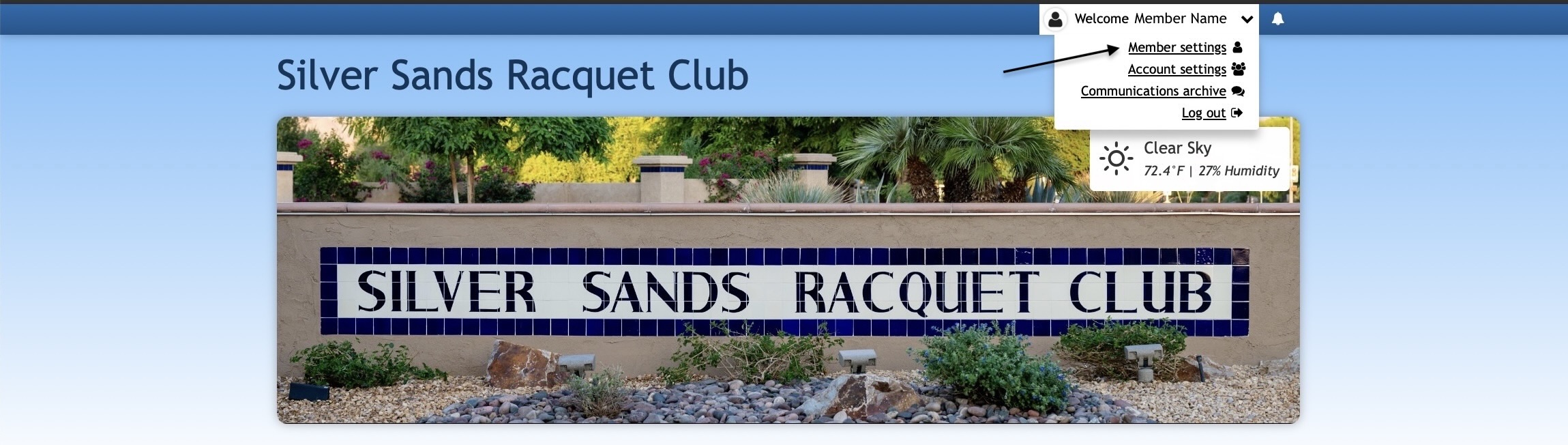
Below is an overview of the tabs you'll find and what information may be managed in each.
- The "General" tab is where you can enter your contact information. This will display on the directory pages and will be the information used for the communications sent to you.
- The "Profile" tab is where you can add a profile photo, employer name and other information about yourself. The information added here will display in the online directory and is a great way for other members to get to know you better! This is also the tab where you can include links to your social media pages.
- The "Password" tab is where you can create a new password for your member profile.
- The “Contact” tab is currently not available but will be activated when additional functions are installed.
- The “Privacy” tab is where you can choose what contact information you would like to be displayed or hidden on the online directory.
Account Settings
In addition to managing your member profile, you have an ability to manage account information, and other members associated with your account, from the "Account Settings" section. To access this area, click on your name in the top right-hand corner of the website and select "Account settings" from the drop-down menu.
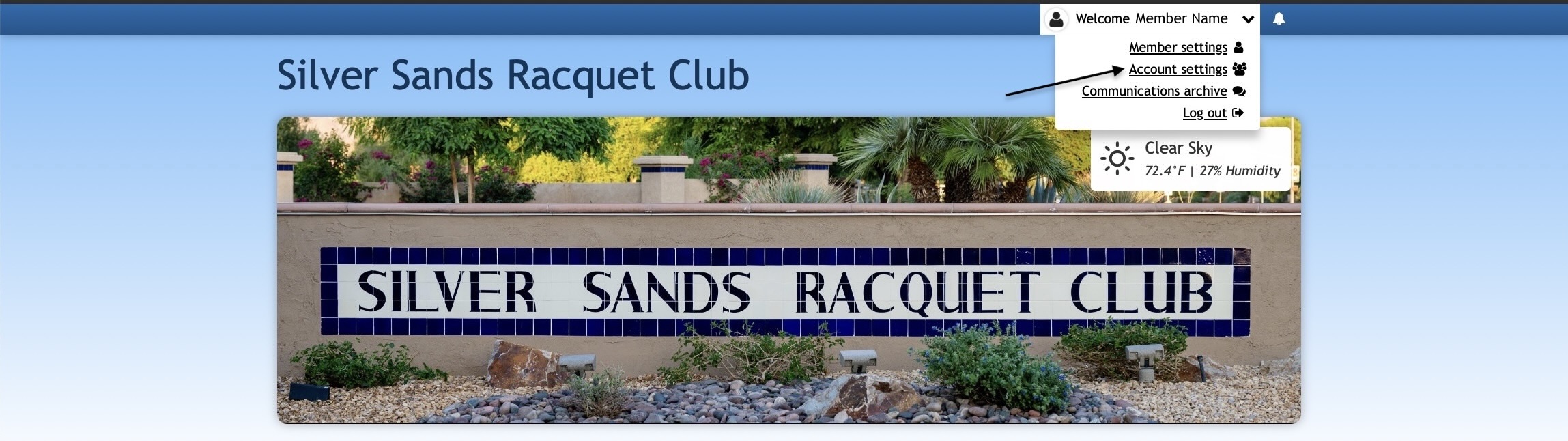
Below is an overview of the information that can be managed per tab.
- The "Addresses" tab is where you can edit, add and delete the addresses and home phone number associated with your account.
- The "Members" tab is where you can add and delete members on your account. You may also edit the name, profile photo, and add an email address for a joint member that doesn't yet have one included. After adding an email address to a joint member's profile, they will receive an email with a link to set up their password. They will then be able to log into their own member profile to manage their contact information and preferences.
- The "Privacy" tab allows you to hide certain information about your account from the resident directory or choose to hide your account entirely. You can also delete your account on this tab.
Updating an Email Address
Making sure the email address on a member profile is correct and up-to-date is important for ensuring the member is able to log into the website and receive any communications sent. If a member's email address needs to be updated, they can make this change at any time.
Who can update an email address?
For security purposes, admins cannot update a member's email address. Therefore, the member will need to log in and follow the instructions below to update this information.
How-to:
- First, log into the website and click on your name in the upper-right-hand corner.
- From the drop-down menu, select "Member settings."
- Here, under the "General" tab, navigate to the "Email Address" field.
- Delete the previous email address and add the new one you'd like to use.
- Once finished, click on the "Save" button.
Resetting a Password
You can easily and securely reset your password. Start by clicking the "log in" link in the top right-hand corner of the website. Then, click the "Forgot password?" link next to the log in button.
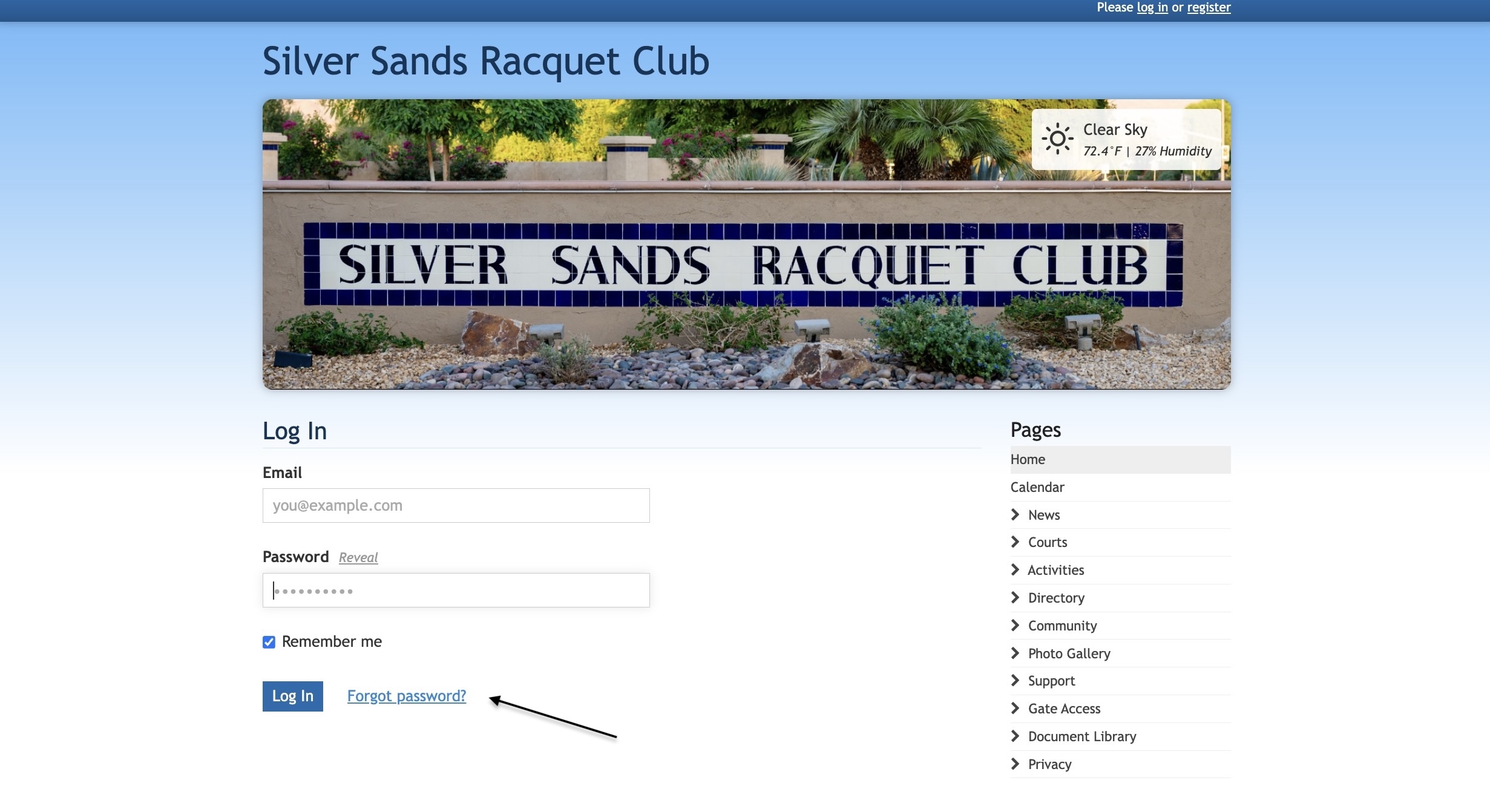
You'll see a new page prompting you to enter the email address currently associated with your member profile.
Shortly after submitting this form, you'll receive an email with a link to reset your password. The link has an expiration date, so be sure to use it right away!

After clicking the link, you'll be taken to a page where you’ll type in your new password. You’ll need to make sure the bar below the "New password" field turns green. This indicates the password is strong enough.
To double-check that the password has been entered error-free, click on the "Reveal" link next to the password field to view what you've entered. Then, click on the “Reset” button to save your new password.

Didn't receive an email?
In case you never received an email from our system, first check your spam messages. If it's still not there, it probably means that the email address isn't registered.
If you know the email address you've entered is associated with your member profile on the website, we recommend contacting your website administrator ([email protected]) or our customer success team for further assistance.
HOA Express Customer Success Team
Availability: Monday—Friday during normal business hours, excluding the holidays we recognize.
How to contact us: You can contact us using any of the following methods: Email: [email protected] Phone: +1 (888) 613-9272 (available 8:00 AM—5:00 PM (CST) Chat: Start a new conversation by clicking on the green conversation icon in the bottom right of our company website. |
|---|
Tip: After viewing a document, click the back arrow (←) to return to the previous screen rather than closing the document window.
Pages
- Home
- Calendar
- News
- Newsletters
- Eblasts
- Bulletin Boards
- Proposed & Pending
- Courts
- Tennis
- Pickleball
- CourtReserve
- Activities
- Leisure
- Recreation
- Amenities
- Directory
- Online Resident Directory
- Printed Homeowner Directory
- Residents by Address
- Community
- New Owner Resources
- Board Members
- Committees & Members
- Emergency Preparedness
- Legacy Donations
- Maps, Plans & Diagrams
- History
- Photo Gallery
- Community Life
- Neighborhood Views
- Support
- Contact Information
- FAQs
- Architectural Changes
- Landscape Changes
- Service Requests
- Renters/Guests
- Website Help
- Gate Access
- Front Gate, Left Lane
- Front Gate, Right Lane
- Back Gate
- Pedestrians & Cyclists
- Document Library
- Key Documents
- Governing Documents
- Forms & Applications
- Policies
- Financial & Insurance
- Board Meetings & Minutes
- Annual Meeting, Reports, Highlights
- Reference Documents
- Board Administration
- Committee Resources
- Projects & Plans
- Privacy
- Privacy Policy